








About 54 million Americans were 65 or older in 2024, and most say they want to stay in their own homes as they age, according to the U.S. Census Bureau and the National Institute on Aging. That choice, often called aging in place, has been made far more possible by a wave of new technology for the elderly.
For families, the challenge is no longer whether helpful tools exist. It is sorting through more options than anyone can easily compare. This guide walks through the main types of technology for seniors at home, what each one is good at, and the single question that matters most when you choose.
Quick Answer
Technology that helps older adults live safely at home includes wearable devices, in-home sensors, mobile apps, health monitoring tools, and video calls. These tools work best when someone reviews what they report and knows how to respond. They support care — they do not replace in-person help or emergency response. Last updated: June 2026.
The main types of technology families encounter
Most technology that supports older adults at home falls into a handful of categories. A 2025 scoping review in the journal Nursing Outlook looked across 105 studies from 2018 to 2023 and found that most homes used more than one type of tool at a time. The categories below are the ones families meet most often.
Wearable devices
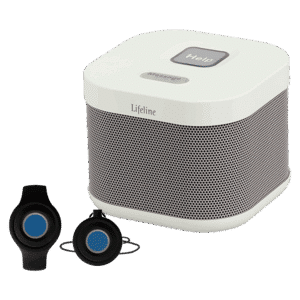
Wearable technology for the elderly is worn on the body, usually as a help button on a pendant or wristband, or as a watch. Many can detect a fall automatically and call for help, and some also track activity and heart rate. In the review, wearables were the most common technology of all, appearing in 31 percent of studies.
Interest in fall detection has grown quickly, and many ordinary smartwatches now include it. There is an important difference worth knowing. A consumer smartwatch can sense a fall and alert a contact, but a monitored medical alert device connects to a response center staffed around the clock, so a trained person answers and decides what happens next. For more on what these watches can and cannot do, see our guide to the benefits of a smartwatch for seniors.
In-home (ambient) sensors
In-home sensors, sometimes called ambient sensors, are placed around the living space rather than worn. They quietly notice things like movement, a fall, or a change in daily routine, with nothing for your loved one to wear, charge, or remember. The review found ambient sensors in 16 percent of studies, and noted they can pick up falls, sleep quality, and everyday home patterns.
Because there is nothing to put on, sensors can be a good fit for someone who forgets a wristband or dislikes wearing a device. Families often have questions about privacy here, which is fair, and we cover that further down. You can also read our guide to home safety and the fear of falling.
Mobile apps and reminders
Phone and tablet apps can support daily self-management, from medication reminders to appointment alerts and simple health tracking. Mobile apps were the second most common category in the review at 28 percent, and most supported what researchers call person-centered self-care, where the individual or family manages day to day with light support.
A medication reminder app for seniors can be as simple as a friendly alert at the right time. The aim is to make the day easier to manage, not to add one more thing to learn.
Health monitoring tools
Some tools track health information such as blood pressure, weight, or heart rate from home. Families can purchase many of these devices independently for general health awareness. Remote patient monitoring, however, is a clinical service — set up and reviewed by a licensed clinicians or care team as part of a care plan — and it usually starts with a conversation with a provider rather than a store purchase. Remote patient monitoring appeared in 26 percent of the studies reviewed. It is most useful for people managing an ongoing condition, and our guide to staying well with chronic conditions has more on living well at home.
Video and telehealth connection
Telehealth for seniors uses video to connect an older adult with a clinician, and sometimes with family, without leaving home. It can save a difficult trip for a routine check-in and make it easier to include a faraway relative in a visit. Telehealth and video tools appeared in about 15 percent of the studies in the review.
AI-assisted tools (an emerging category)
Unlike many traditional technologies that respond after an event occurs, AI-enabled tools are designed to be proactive and predictive. Rather than waiting for a fall or a missed medication, these systems continuously monitor patterns and trends — detecting subtle changes before a crisis develops.
For example, an AI system might notice declining mobility, a slower walking speed, increased nighttime bathroom visits, and reduced overall activity. Taken together, these signals can flag a rising fall risk, allowing a care team or family member to intervene before a fall ever happens.
AI companions for older people can also support daily routines through spoken reminders or friendly check-in conversations — prompting someone to drink water or take their medication. These tools can help reduce feelings of isolation too. To learn more about connection itself, see how social connection supports mental health.
AI and machine learning appeared in 19 percent of studies in the review, and researchers flag this as the fastest-moving and earliest-stage area in the field. The predictive capabilities are promising, but the technology is still developing — it is one to watch rather than rely on as a primary safety layer today.
The question that matters most is not which device, but who responds
Here is the part that is easy to miss. A device that notices something is only helpful if a person reviews it and knows what to do next. The same review found that technology is advancing faster than the care processes around it, and that only 5 percent of the studies shared information across the people and places involved in someone’s care.
For a family, this is the difference between a gadget that sends an alert into the void and a service where a real person answers, makes a judgment, and reaches the right help. When you compare options, ask not only what the device can detect, but who is on the other end when it does.
Matching the technology to what you are worried about
The easiest way to choose is to start from a specific worry rather than a feature list. The review noted that many devices now overlap in what they do, which makes comparing spec sheets confusing. Naming the concern cuts through it.
If the worry is falls, look first at wearables with fall detection or in-home sensors. If it is missed medications, look at reminder apps. If it is an ongoing health condition, ask the provider about remote monitoring. If it is isolation, look at video connection and the newer AI tools. Match the tool to the worry, and the choice gets much simpler.
Worn or not worn, a simple way to compare
For fall safety in particular, families often weigh something worn against something placed in the home. Here is the honest trade-off.
| Worn on the body (wearables) | Placed in the home (sensors) | |
|---|---|---|
| What it covers | Detects falls and can call for help wherever the person goes, including outside | Ceiling- or wall-mounted sensors (radar, motion, or infrared) watch the living space and can detect falls or changes in routine without anything worn — but only at home, not outside |
| What it needs | Has to be worn and charged | Nothing to wear or charge; sensors are installed in the home |
| Best when | The person is active and goes out | The person prefers not to wear a device |
Many families combine the two. Whichever you choose, a monitored option adds the one thing a gadget cannot, a person who responds.
A quick word on privacy
It is common for an older adult to worry that technology means being watched, and that worry deserves a real answer rather than a brush-off. In practice, most home sensors track patterns like movement or a fall, not video or audio, and the person can usually decline or pause them.
The step that matters most is an honest conversation about what a device does and does not do, led by someone they trust. We are publishing a separate guide on how to have that conversation, and will link it here when it is live.
Questions families often ask (FAQs)
What technology helps an older adult who lives alone?
For someone living alone, the most useful tools are a wearable help button or watch with fall detection, in-home sensors that notice changes in routine, and a fast way to reach help. The right mix depends on the main concern, whether that is falls, memory, or staying connected.
Is a wearable or an in-home sensor better for fall detection?
A wearable detects falls wherever the person goes, including outside, but it has to be worn and charged. An in-home sensor needs nothing worn and watches the whole space, but only at home. Many families use both, and a monitored device adds a person who responds.
What is remote patient monitoring, and how does someone get it?
Remote patient monitoring lets a clinician track health information such as blood pressure or weight from home. It is set up and reviewed by a doctor or care team as part of a care plan, so it usually starts with a conversation with the person’s provider, not a store purchase.
How can families keep an older adult safe at home without being intrusive?
Start with the specific worry and choose the least intrusive tool that addresses it. Many sensors track patterns like movement rather than recording video or audio, and the person can usually decline or pause them. An honest conversation about what the device does makes all the difference.
Where to start
You do not need to solve everything at once. Name the one worry that is keeping you up at night, pick the category above that speaks to it, and start there. You can always add later.
If a help button or fall detection is where you want to begin, our guide to choosing between mobile and home-based medical alert is a good next read, and you can explore Lifeline options or talk through what fits your situation.
Medically reviewed by Rosemary Kennedy, PhD, RN, FAAN.
The right technology is the one that fits your loved one’s routine — and connects to a real person when it matters. See how Lifeline works or take the product quiz to find the right fit.
Related Reading: Understanding Fall Detection and How It Works | Why ‘Call Me If You Need Anything’ Is Not a Safety Plan